PC Supporter: We are writing reviews & overviews about latest Technology, Gadgets, Social-networks, HP Printers, Operating Sys, PC Games & Wallpapers

Showing posts with label Networking. Show all posts

Thursday, 6 December 2012

How to Set Up a Homegroup in Windows 7


Sharing Files, Media and Folders on any Network now a days isn't a big deal for many of Windows 7 users, but some users still find it hard to connect to Home Network to Share files with other Computers.


Definitely you can get you Answer on Google or else where very easily within a few minutes to how to get create and connect to Home Network, but while you searching and you are not a regular or pro user you will   find some articles which are written for Pro users, and you will find this hard to follow and get connected.


Here we are going to share Mr. Mike Halsey (www.thelongclimb.com) article, who is describing the connectivity to HomeGroup Network really simply, and hope after reading this you will be able to connect your Computer to other computers situated at your Home or Office.


Before going to the process lets read a quick tip.


Manage advanced network sharing Settings
Start and type Manage advanced sharing Settings press Enter

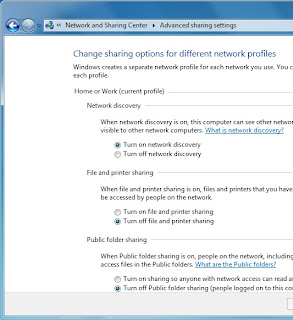
If you want to share documents, photos, videos and music within your home use the Network Sharing Center to check your security settings are set right. The security options are clear and easy to understand with plain English throughout. To checkout your Network Sharing options click Start and type Manage advanced sharing Settings then press Enter, and make sure your settings are same like the image below.


You can share your internet connection, Printer(s) and files. The settings here allow you to set what's shared and who can see it.


You can also share folders by Right Clicking on one or more in Windows Explorer and selecting Share with in the context menu that appears.


You can choose from users on your PC and network who the folder is shared with,   or you can share a folder with your Homegroup.


Setting up a Homegroup.


Homegroups are new to Windows 7 and they're an excellent way to share Music, Pictures, Media files and also Printers with other PCs running Windows 7 on your home network. To create a Homegroup open Network and Internet from the Control Panel and then click on Create a Homegroup.


Alternately you can type Homegroup in Search box in Start Menu. The picture showing what kind of files and stuff you want to share with other computers, after choosing one or all, click Next.


Your Homegroup is now automatically created and  you will be given a password to type in computers you want to connect with this Homegroup network.


After creating a Homegroup network, remember this is your Host PC, and you can change any setting anytime by typing Homegroup in Search bar inside Start Menu.


How to Connect to Homegroup


Now its time to connect other computers to this Homegroup network, same way, open Homegroup by the way described above, The system will show all available Homegroups (remember the host PC must be switched ON). You will be asked for the password and then what files and documents you want to share from the new PC.


In Windows 7 Homegroup an additional and useful feature is the ability to stream media to other PCs and devices. This means music and video content can start playing on the other devices without being copied across to that device. It plays on the PC it's sat on and can be seen and heard on the other.


If you are using Wi-Fi - This is how you can make better your Streaming Video or Music:


If you use a Wi-Fi network in your home and want to stream and share video consider upgrading your Wi-Fi routher from the 802.11b or 802.11g to 802.11n standard. These codes are clearly labelled on products either at online stores on in the shops. Wireless N offers much greater bandwidth than previous standards. This means that video can be sent to other PCs on your network without any worries about it stuttering during playback.


Friday, 16 December 2011

The Future of Malware | News


The future of Malware | News from �PCadvisor.com�


Future of MalwareSecurity breaches look set to bet worse as hacker groups target smartphones and social media and release more information online. Jeff Vance reports.


Personal information leaked online is becoming an all too common occurrence. For example, Sony suffered a massive breach of its PlayStation Network earlier this year that led to the theft of names, addresses and possibly credit-card data belonging to 77 million users.


If you think the situation is bad now, just wait. Things will get worse as more information is dumped online by mischievous hacker groups such as Anonymous, and cybercriminals begin to target smartphones and social media.


In August, AntiSec (a collaboration between Anonymous and the disbanded LulzSec group) released more than 10GB of information from 70 US law-enforcement agencies. According to Todd Feinman, CEO of DLP vendor Identity Finder, AntiSec wasn�t motivated by money.


�AntiSec doesn�t like how various law-enforcement agencies operate and it�s trying to embarrass and discredit them,� he said.


But, he added, what it doesn�t realize is that when it publishers sensitive persona information, it�s helping low-skilled cybercriminals commit identity theft. Every week, another government department or business has its records breached � some 250,000 to 500,000 each year, estimated Feinman. Few details from those breaches are published online for all to see, however.


While certain high-profile attacks, such as the one on Sony, are intended to embarrass and spark change, the US law-enforcement breach could represent a shift in hacker thinking. AntiSec�s motivations appear to have a key difference, with the attackers consciously considering collateral damage as a strategic weapon. According to Feinman, AntiSec wrote online; �We don�t care about collateral damage. It will happen, and so be it.�


Social Networking


Facebook Malware

Experts say the future of malware is more about how potential victims will be targeted than how it will be engineered. Collateral damage won�t be limited to innocents compromised through no fault of their own.


Have you ever accepted a friend request on Facebook or connected to someone on Linkedin you don�t know? Perhaps you thought it was someone from school you�d forgotten about, or a former colleague whose name had slipped your mind. Not wanting to seem rude, you accepted them as a friend and quickly forgot about it. �When people make trust decisions with social networks, they don�t always understand the ramifications. Today, you are far more knowable by someone who doesn�t know you than ever,� said Kr Hugh Thompson, program chair of RSA Conferences.


We all know people who discuss everything they do on a social network or blog, from eating their breakfast to clipping their toenails. While most of us consider these people a nuisance and may hide their status updates, cybercriminals love them.


�Password-reset questions are easy to guess, and tolls such as Ancystry.com, while not created for this purpose, provided hackers with useful information,� said Thompson.


There are a few areas he believes the IT security industry needs to concentrate on: security for social media, ways to manage the information shared about you, and better methods for measuring evolving risks.


Enterprise Targets


mobile malware and your businessFake security software is the most common type of social-engineering attack that researchers at Blue Coat Systems come across. Chirs Larsen, head of the lab, explained that social network�s aren�t being used only to target individuals.


Larsen outlined a recent attack attempt where hackers targeted executives of a major corporation through their spouses.


The chances were at least one of the businessmen would have a poorly secured home PC that he shared with his non-tech-savvy wife. This would provide the backdoor needed to gain access to the company.


�Whaling is definitely on the rise,� said Paul Wood, senior intelligence analyst for Symantec.cloud. �Just a couple years ago, we saw one or two of these sorts of attacks per day. Today, we catch as many as 80.�


According to Wood, social engineering is by far the most potent weapon in the cybercriminal�s toolbox (automated, widely available malware and hacking toolkits are number two). Combine that with the fact that many senior executives circumvent IT security because they want the latest and trendiest devices, and cybercriminals have many valuable, easy-to-hit targets in their sights.


�Attacks on small businesses are increasingly dramatic because they are usually the weakest link in a larger supply chain,� said Wood.


There�s no sure way to defend against this. Until companies start scrutinizing the cyber-security of their partners and suppliers, they can�t say with any certainty whether or not they themselves are secure. While it�s common for large firms to keep a close eye on their suppliers, with factory visits that result in the implementation of an array of �best practices�, companies aren�t doing this when it comes to cyber-security.


Smartphone Threats


AndroidMalwareSmartphone threats are on the rise, but we�ve yet to see a major incident. This is partly due to platform fragmentation. Malware creators still get better results by targeting PCs or websites.


Larsen believes that platform-agnostic, web-based worms represent the new frontier of malware. Platform-agnostic malware lets legitimate developers do same of the heavy lifting for malware writers. As developers re-engineer sites and apps to work on a variety of devices, hackers can then target the HTML, XML, Jpegs and so on that render on any device anywhere.


Mobile phones are serving as a second identity factor for all sorts of corporate authentication schemes. Businesses that used to rely on hard tokens, such as RSA SSecureID, are moving to soft tokens, which can reside on mobile phones roaming beyond the corporation as easily as on PCs ensconced within corporate walls.


�Two-factor authentication originally emerged because people couldn�t trust computers. Using mobile phones as an identity factor defeats two-factor authentication,� said Marc Maiffret, CTO of eEye Digital Security.


Today, Android is the big smartphone target, but don�t be surprised if attackers soon turn their attention to the iPhone � especially if third-party antivirus programs become more or less standard on Android devices. iPhone demographics are appealing to attackers, and security experts will tell you that Apple products are notoriously insecure.


Apple is reluctant to provide third-party security entities with the kind of platform access they need to improve the security of iPhones, iPads, MacBook Airs and so on. �Apple is very much on its own with security,� said Maiffret. �It almost mirrors late-90s Microsoft, and it�ll probably take a major incident or two to incite change.�


If we�ve learned anything about security in the past 20 years, it�s that another major incident is always looming just over the horizon. With the number of IP-connected devices climbing to anywhere from 50 billion to a Trillian in the next five to 10 years, tomorrow�s hackers could target anything from home alarms and air traffic-control systems to flood control in dams.


Monday, 31 October 2011

EnGenius ESR9855G | Multimedia Enhanced Wireless 300N Router for Gamers

EnGenius ESR9855G | Multimedia Enhanced Wireless 300N Router for Gamers | Review

The EnGenius ESR9855G Multimedia Enhanced Wireless 300N Gaming Router is a single-band device, blown up with advanced features and generous a spiky managing interface. It delivers strong throughput at close range in a row in 802.11 b/g/n (Mixed) modes, but that throughput down off at distance increasing. Unexpectedly, speed actually declined when we set the gadget (EnGenius ESR9855G) on 802.11n only mode. This makes for a router that aims high yet falls short in retaining constantly strong throughput. It's the one big mistake in this gadget, otherwise very good router.


EnGenius ESR9855G Multimedia Enhanced Wireless 300N Gaming Router
Specs and Design

Among consumer router, the ESR9855G�s design is only one of its kind. It's an authentic eye catcher, with black shiny top and bright orange bodywork. Two external 3dBi Dipole antennas attach to both sides of the router. Inside are the Ubicom IP7K + Atheros AR9223 (RF) chipset. The front panel has LEDs for monitoring power, client connections, WAN and WPA. The rear houses four Gigabit LAN ports, a WAN port, and a power switch.  On top of the unit is a WPS button for easy client connectivity. The bottom of the device has two wall mount sockets.
The design is apparently conducive to cool running, as the router remained cool to the touch after two days of uptime.
Setup and Features

The setup process, which requires wiring a computer to the device, seems dated when the norm is wireless setup found in routers such as the Cisco Linksys E4200 Maximum Performance Wireless-N Router or Belkin's N750 Wireless Dual-Band N+ Router, but it is still easy and efficient. The router ships with a CD containing the user manual and the EnGenius Smart Wizard, a browser-based interface rather than an executable file.
Setup commands are very detailed, illustrating how to power up and connect the cables to the router. My WAN settings were picked up right away. By default, the router was configured to run in mixed mode with no security setup. This may be problematic for less technical users. Routers from Cisco/Linksys and other vendors incorporating security configuration into the initial setup process; it�s just that important. Since EnGenius is marketing this to the savvier gamer set, the omission of security configuration from setup is forgivable.
The interface is sharp. It's clean, and easy to navigate through. The color choices and font-sizing makes it very easy on the eyes. Once the router is set up, the interface allows for further configuration of basic and advanced settings. A wireless wizard within the interface walks users through the basics�changing the SSID and setting up security. Although, as mentioned, security isn't configured during initial setup by default, EnGenius does a good job of conveying what the different security settings mean, with WPA2 listed as "Best."
Advanced settings allow for very granular tweaking of settings that most users won't want to fuss with, such as transmit power and DTIM interval. In between the very basic and very advanced settings are lots of other features in this router. The device offers DHCP, SPI firewall, VPN pass-through, Dynamic DNS, virtual server mapping and port forwarding.
QoS is done with feature called SteamEngine. When enabled, it aids in prioritizing traffic, which is why this is a router targeted for gamers and multimedia enthusiasts.
While some throughput issues stop me short of recommending this as a small business router, there are some capabilities that would be attractive to a small business. For instance, the ESR9855G supports WPA2-Enterprise encryption, and users can establish up to four distinct WLANs.

Thursday, 20 October 2011

Avoiding | Filtering | and Blocking Spam

PC Supporter

Avoiding, Filtering, and Blocking Spam

Security_WarningSpam is unsolicited, unwanted e-mail�junk mail. When you first get an e-mail account, you receive very little spam. The spam starts to f low when you post your e-mail address on the web or sign up for free offers with companies that pass your e-mail address to others. Once your e-mail address lands on a spam list as a legitimate address, the spam is almost impossible to stop. When it comes to spam, an ounce of prevention is worth a kilo of cure. Here are a few tips for preventing spam:


  • Don�t use your primary e-mail address to register for anything on or off the web. Get a free e-mail account from Gmail, Yahoo!, or Hotmail and use this disposable e-mail address to register for stuff. If you start receiving too much junk e-mail, you can dump the address and use a different one.
  • If you receive a spam message, don�t reply to it. Replying verifies your e-mail address to the spammer and encourages more spam.
  • Don�t put your primary e-mail address on the web�for example on your website or blog. Spammers scan the web for e-mail addresses.

PC Supporter Tips

TipsIf you�re receiving an overwhelming amount of spam, try the following solutions to slow the flow:


  • Log in to your Internet service provider�s website to find out whether it uses a spam blocker and whether you can configure it to make it more aggressive in identifying spam.
  • If you have the e-mail account through a hosting provider (a business that hosts your website), log in to your account to find out about available options.
  • Purchase and install a spam blocker of your own. You can find plenty of good spam filters/blockers out there, including SPA Mfighter (www.spamfighter.com), ChoiceMail (www.digiportal.com), and Spameater Pro

E-MailMost newer e-mail programs offer some sort of spam protection (perhaps in the form of a Junk Mail folder) and enable you to enter settings to make the program more or less aggressive in identifying spam. In addition, you can usually create lists of safe senders and blocked senders and block e-mail from certain domains or countries. Search your e-mail program�s help system for �spam� to determine what, if any, spam protection features are available.

(www.spameaterpro. com), to name a few.

Know Your Browser�s Security


PC Supporter


Checking Your Internet Browser�s Security Settings


IE7_128Your web browser has its own security guard on duty that checks incoming files for potential threats. If you try to enter information such as a credit card number on a form that�s not secure, the web browser displays a warning message asking if you want to continue. If a site attempts to install a program on your PC, your browser displays a confirmation dialog box or a warning near the top of the window asking for permission to download and install the program.


With most browsers, the default security settings are fine, but they may be a little on the aggressive side, warning you too much. In any event, checking your browser�s security settings is usually a good idea, just in case your browser has a setting you�d like to change. To check security settings in Internet Explorer, click Tools, Internet Options, and then the Security tab.


If you use a browser other than Internet Explorer, check the browser�s help system for information on how to enter your security preferences. All browsers have security features, although they all handle them a little differently.


PC Supporter Tips!


TipsTo protect your PC against viruses, purchase and install a good antivirus pro�gram, and keep it updated with the latest virus definitions.


To prevent unauthorized access to your PC, enable the Windows firewall or configure your router�s firewall settings.


Update Windows 7 regularly to ensure that you have the latest security updates installed.


Log in to a standard user account for your daily activities to limit access to your PC in case a hacker breaks in and takes control of it.


To avoid potential virus infections from e-mail attachments, install an antivirus program and open attachments only from trusted sources.


Social Links

➤