
How To Install Sony Movie Studio 13 0 Full Version 32 Bit Full Tutorial Shoaib Tech
Monday, 2 September 2019
Sunday, 2 August 2015
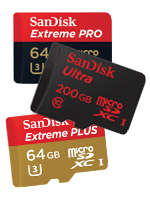
SanDisk is a brand people trusts blindly when it comes to Multimedia storage on their gadgets.
My today's focus is on the SanDisk's best selling microSD card, in a budget range, durable and proficient. This is SanDisk Ultra 32GB and 64GB top selling component of the company, exactly what your smartphone and tablets are made for.
Expandable storage can always give you more control over your data in transferring, syncing and sharing it directly by connecting it to other devices. Unfortunately few latest gadgets don't give you any option to expand your memory as they removed the external memory slot or a well known iPhone in this case isn't having any slot for external memory, but the fact is we all need mobility when it comes to data storage, and SanDisk is serving us with best of their products. Fact is that most of our smartphones, tablets and other gadgets still has the memory slot made for SanDisk.
Tuesday, 5 May 2015
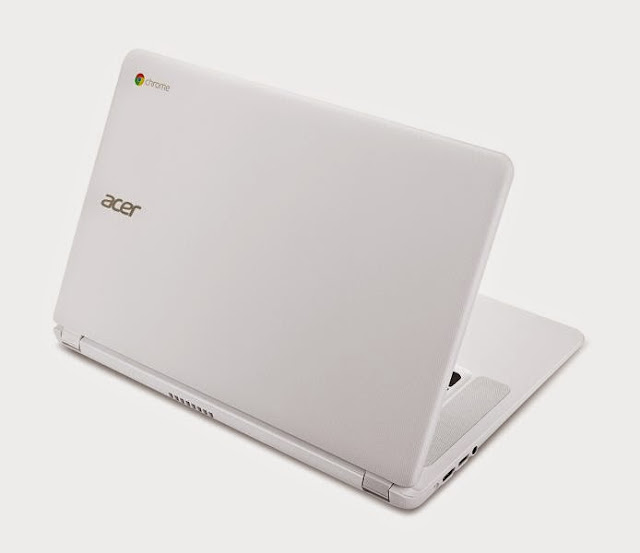
Acer Launches 15-inch Chromebook At CES 2015, Intel Broadwell Chip Onboard http://flip.it/SJwHN
Acer is getting the Chromebook ball rolling at CES 2015 with the first 15-inch model.
The Acer Chromebook boasts a 15.6-inch display, an industry first. Historically, Chromebooks have been small laptops, typically having screens ranging between 11- and 12-inches. This year, however, Hewlett-Packard began marketing the first 14-inch Chromebooks, taking the Google Chrome operating system-based portables into traditional laptop territory.
It’s also joins a new crop of laptops featuring Intel's 5th Generation Core “Broadwell” processor, which is targeted at ultrathin laptops, hybrid laptop-tablets, and tablets.
It’s also joins a new crop of laptops featuring Intel's 5th Generation Core “Broadwell” processor, which is targeted at ultrathin laptops, hybrid laptop-tablets, and tablets.
Another trend in Chromebooks is higher-resolution displays. In keeping with this, the Acer Chromebook 15 will have an option for a 1,920×1,080 pixel display.
It weighs in at 4.85 pounds and is 0.95-inches thick
Sunday, 29 June 2014

Today I will tell you how you can allow or block a program to be connected to the internet, from Control Panel but first we should know :-
Why do you need to block a program to be connected to the Internet?
Well, answer is so simple, "Because I dont want to update this Program anymore from its server on the Internet." In other cases, when you crack a Software or a PC Game or download a crack for your favorite PC Game, most of the times you will see a *.*txt file inside that Crack folder giving you instructions how to install that Game. And when you see "Block this game to be connected to the Internet from Control Panel > Windows Firewall.
If you are using your PC at Home for playing games in free time, very little chances you have installed any Antivirus software in your PC or if you are using a paid version of Antivirus software, you will open it mostly once in a week. But I would suggest you should open and read what's inside settings or inside advance settings, but never try to change any settings you are not familiar of.
If you look closer inside your Antivirus settings you will find the exact settings of allowing or blocking a program from Internet. But here I am showing your the same settings from Control Panel, in case you don't have any Antivirus Installed.
A look at my PC settings first, I am using Windows 7 Ultimate with AVG Free Antivirus Installed. Don't worry if you are using Windows 8 or 8.1 or any version of Windows 7, all you need to do is to find where that Control Panel is...
Follow me if you are using Windows 7.
1. Click Start
2. Type the word "Allow", you will see "Allow a program through Windows Firewall" on the top, press Enter or click on it.
NOTE: If you are using Windows 8 you can still find this settings under Control Panel.
3. This setting will be opened, where you can easily check the boxes to allow or block a program through Windows Firewall. In case you aren't able to click the boxes, make sure you clicked the "Change Settings" button (showing on the top right in the picture).This is all done, once you blocked a program through Windows Firewall it will not be able to connect to internet anymore, and will not be updated.
As I mentioned before, you can also block a program through your Antivirus settings, if you have one.
Thanks for reading, your feedback will be appreciated.
Sunday, 11 May 2014

How to Choose the Right Tablet? Windows: Android, Apple, or
By Wendy
Sheehan Donnell
It's difficult to remember a time before tablets, but
it's been four short years since the original Apple iPad hit the scene, and the
current tablet market was born. Since then, we've seen scores of manufacturers
trying to snag a slice of the tablet pie. And the game is finally getting
interesting: For the first time in 2013, Android tablet sales overtook the
iPad. Growth is so rapid in the segment that some analysts claim tablets
will make up half the PC market in 2014. There's no denying the tablet is here
to stay.
But which tablet is right for you? Whether you're eyeing
an iPad, one of the many Android tablets available, or a Windows model, here
are the key factors you need to consider when shopping for a tablet:
Friday, 9 May 2014

How much RAM do you really need
It doesn't always needed to add more memory for better
performance or in other words more memory doesn't always means better
performance. In fact, you may need less RAM than you think. Darien Graham-Smith
at PC Pro 2014 explains.
Typically,
today's budget PC's come with 4GB of RAM. A mid-range configuration may offer
double that, and high-end gaming systems and workstations go as high as 16GB.
There's
no doubt which way the wind's blowing, either: Windows 8 supports up to 128GB
of physical memory (assuming your're running the 64-bit edition), while Windows
8 Pro can go up to 512GB.
Does
anyone really need this much RAM? Memory isn't as expensive as it used to be,
but there's obviously no point paying for gigabytes of RAM from which you'll
receive no material gain.
Thursday, 8 May 2014

How to Install Hp LaserJet 1320 Printer in Windows 7?
Today Windows 7 is the most popular Operating
System using in Homes & Offices all over. In early days due to
non-compatibility and support to many Devices (like Printers, Scanners etc.),
Windows 7 was not a Primary Operating System according to Professional’s
remarks.
Many companies made their devices compatible to this New
Operating System with updating their Software and Drivers for Devices like Printer,
Scanners etc., some of other companies made brand new Devices for new operating
system. But some devices were far behind due to non-compatibility with Windows
7, and users were waiting for new release of drivers.