PC Supporter: We are writing reviews & overviews about latest Technology, Gadgets, Social-networks, HP Printers, Operating Sys, PC Games & Wallpapers

Showing posts with label Intel. Show all posts

Monday, 19 November 2012

6 Features - Your Windows 8 Tablet Must Have


Windows 8 Build for Touchscreen Devices? Yes, but do your new Windows 8 Tablet have these 7 features?


Before going to overview these features, first we talk a little about New Windows 8 Operating System. There are two main version of Windows 8 are available for touchscreen gadgets, "Windows RT and Windows 8". 


Basically Microsoft prepare and organize this new operating system for touchscreen devices, no doubt, and doesn't matter if its RT or 8 version, but Windows RT is slightly different than 8, as it designed to be more friendly with Touchscreen devices, Internet connectivity and as well for a device with longer battery life. Although some tablets makers ( I would say) don't like it, but if we go deep inside, Windows RT is viewed as more of a tablet operating system in the mold of Apple's iOS, while Windows 8 tablets may appeal to PC users looking for backward application compatibility. 


According to PC Advisor (a technology magazine publishers), "The cheapest RT tablet is Microsoft's Surface, which starts at �399." And "Windows 8 tablets will be competitive on price, however.


Lets talk about 6 features your new Windows 8 tablet must have.


1. Application compatibility


With a few exceptions, existing Windows applications will not work on RT. This is partly because ARM processors haven't previously supported major desktop Windows client OSes. But existing applications will work on Windows 8, as previous Windows OSes over the past few decades were written primarily for Intel or AMD processors. Microsoft has adopted a new application model with Windows RT and 8, and users will be able to download apps through the Windows Store.


2. Peripherals and accessory compatibility with RT


A lack of drivers may prevent some older peripherals, such as printers or cameras, from working with RT, but that doesn't mean your peripherals won't work. It's worth checking with device makers to see whether they have drivers for RT. Dell and HP have published compatibility lists for their printers.


Read here if you searching for your PC hardware drivers, compatible with Windows 8. "Where To Download the Latest Windows 8 Drivers for Popular Hardware"


3. Memory Limit


Windows RT is only 32bit, so tablets running the OS can draw on only up to 4GB RAM. Windows 8 tablets with Intel's Clover Trail Atom chip will also be only 32bit. However, tablets with Intel's PC-like Core processors run a 64bit version of Windows 8, and can handle more RAM and storage.


Tablets are adequately served with 32bit processors today but, with the usage of demanding applications growing, storage and memory needs will increase in mobile devices. ARM has taken a step ahead by announcing its ARMv8 64bit architecture, with chips likely to appear in 2014. Microsoft has not announced its 64bit plans for Windows RT.


4. ARM processors options


Windows RT tablets have already been announced with chips from nVidia and Qualcomm, which are based on ARM processors. Microsoft's Surface, Asus' Vivo Tab RT and Lenovo's IdeaPad Yoga 11 hybrid use nVidia's quad-core Tegra 3 processor, which may appeal to gamers and users looking for fast performance. Samsung's Ativ Tab and Dell's XPS 10 run Qualcomm's dual-core Snapdragon S4, which balances performance, battery life and connectivity.


5. Hardware limits


Windows RT tablets have only USB 2.0 ports. However, backward compatibility allows peripherals such as external storage devices with USB 3.0 ports to connect to RT tablets. The peripherals will work only if compatible with Windows RT, though, USB 3.0 ports are available in Windows 8 tablets running Intel's Core processors.


6. Enterprise Features


Dell and Samsung have highlighted enterprise features in RT tablets. Dell's XPS 10 tablet can be remotely disabled if lost or stolen, and software images and updates can be pushed to tablets. Dell has also included some security features such as TPM, a hardware-based cryptography and authentication technology. Samsung has included Microsoft Exchange and Cisco VPN support in its Ativ Tab.


Tuesday, 30 October 2012

5 Top Features Your Ultrabook Must Have


5 Top Features Your Ultrabook Must Have if you prefer to buy one rather than MacBook Air.


According to your use and profession If you consider that Ultrabook suits you more than MacBook Air or you are interested to buy an Ultrabook rather than MacBook Air, so there are some actual features your Ultrabook must have.


According to style, features and something that called Trend, Apple's MacBook Air is a top Notebook but on other side Intel's super fast chipped Ultrabooks is more liked because of its compatibility and user friendly environment operating system (Windows).


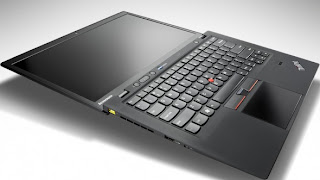
So you have decided you want to buy an Ultrabook rather than a MacBook Air? Here are 5 top features to consider before making your purchase.


Quality Construction


Quality Construction - Ultrabook


Many of the unique or unusual characteristics about Ultrabooks come about because they're so thin, a height of three quarters of an inch, and even less in some cases. One of the most important of these is the systems' tendency to feel flimsy. Because most laptops don't sit at home on your desk all the time, you want the sturdiest on you can find, whether it's open or closed.


Keyboard


Keyboard - Ultrabook


Key travel on Ultrabooks is frequently shallow, after all, there's not a lot of room to house big, strong keys! This won't be a problem for everyone, but if you're a hard core typist or if you are going to need your laptop for work, you'll want to pay special attention to the keyboard. If you can, try typing on an Ultrabook you're interested in before you take it home to get an idea of how it feels beneath your fingers. You don't want to buy a notebook you won't enjoy typing on.


Port Selection


Port Selection - Ultrabook


The reduced height of ultrabooks causes problems with ports as well. Many systems simply don't have room for Ethernet ports, some have far fewer USB ports than you may be used to (may be only one or two), and still others may come with dongles that give you the ports but add inconvenience to the package. Knowing what you need, so you know what you'll need to put up with, is an especially good way to go here.


Touch Screen


Touch-Screen - Ultrabook


Although not a part of the standard ultrabook specs, and previously impossible to find on many systems, touch screens should now be considered a necessity. The new tile based Windows 8 interface was designed for touch, and the operating system just doesn't deliver the same experience without it. A laptop with a traditional touchpad will work, but it won't be anywhere near as intuitive. To get the most out of your Windows 8 Ultrabook, make sure it comes with a touch screen.


Wireless Display


Intel's Wireless Display technology (usually shortened to WiDi) lets you stream HD content over the air to your HDTV, rather than forcing you to connect your set to your laptop with an HDMI cable. You'll need a separate adapter, like Netgear's $100 Push2TV (pictured here), to make it work, but if you're really into entertainment you'll easily find WiDi capability worth the extra investment.


Tuesday, 23 October 2012

MacBook vs Ultrabook - A Comparison by PC Supporter


Lets Compare MacBook and Ultrabooks in a slightly different angle. The source is once again PC Magazine and we just present an overall review about all features.


Although Apple's paper thin laptop has quite a bit in common with Intel Ultrabooks, in a few ways we describe below they are significantly different.


Source: PC Magazine


DESIGN


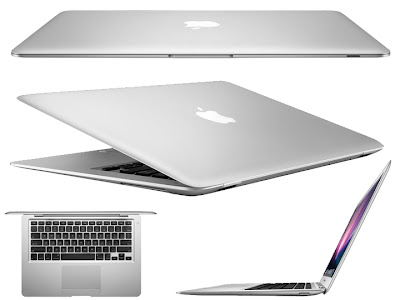
You can't ignore the Apple aesthetic the company's computers always look terrific, and the chic shape and sly silver coloring of the MacBook Air make it among the sharpest of all. Outward attractiveness is not an official part of Intel's ultrabook plan, so you may find something sparkling or something ordinary; it all depends on what choices the manufacturer makes.


COMPONENTS


Everything that goes into a MacBook Air or pretty much any other Apple computer, for that matter must meet Apple's strict requirements and interface properly with the OS X operating system, so every time you pick up an Apple computer you know what you're going to get. Many ultrabook manufacturers, on the other hand, want to keep costs down, and therefore exert less control over the hardware they include. This doesn't mean it will be inferior to what Apple uses, but it does mean that with ultrabooks, as with most other PCs, performance and compatibility characteristics are not as easy to predict. If you can, try before you buy to make sure the touchpad, keyboard, and general responsiveness are what you're looking for.


DISPLAY


The screen on the 11 inch MacBook Air maxes out at a resolution of 1,366 by 768, and the 13.3 inches display at 1,440 by 900. Those are decent specs, and the displays look good, but forget about watching full 1080p video on them, 720p is all they can handle. Most ultrabooks have screen resolutions similar to Apple's, but some out there are capable of displaying full 1080p (1,920 by 1,080) video.


Storage


All of Apple's MacBook Airs are loaded with from 64GB to 512GB of flash storage, making for incredible data access speeds; traditional spinning hard drives are not even an option on the Apple machines. Ultrabooks, however, can come with either, thus requiring the user to choose between storage that's plentiful, inexpensive, and slow, or limited, pricey, and very fast.


CONNECTORS


Any seriously diminutive system is going to have an extremely restricted port selection. What has really defined the MacBook Air to this point has been its Thunderbolt port, which combines PCI Express and Displayport protocols for high speed connections to devices as diverse as hard drives and external monitors, and is about as small as ports get. Thunderbolt ports haven't appeared on PC based ultrabooks yet, but it's only a matter of time until this changes.


HOW THIN AND LIGHT IS THE FUTURE?


As ultrabooks are scarcely more than a year old, it's tough at this point to see how they'll shake out long term. But despite some early stumbles and iffy sales numbers, the form is likely to hang on for a while maybe a long while. As computing devices grow smaller but users want larger amounts of power, they'll have to evolve to stay relevant. But because they're full, feature rich systems, they have more room to grow than is probably the case with even the best tablets and smartphones. Intel will undoubtedly face competition from other imitators, HP came out with an AMD based Sleekbook, for example but it will continue to dominate on the PC side for the time being.


Not that this means there's any chance the MacBook Air will go anywhere. One of Apple's defining (and most striking) products, it's still the first thing people think of when they think of ultrathin laptops and so far no Intel ultrabook has come close to changing that. The biggest threat to the MacBook Air is Apple itself; Can company devise something better to replace it? If not, expect it to continue receiving yearly updates that make it thinner, more powerful, and more exciting.


In any event, super thin laptops are here to stay, all that remains to be seen is where they go next. How much smaller and skinnier can they get? Time will tell, but with Intel and Apple leading the charge and squaring off against each other every step of the way consumers will only benefit by seeing computers that get ever more portable even as they get ever more powerful.


Tuesday, 29 May 2012

Intel Lauches StudyBook Tablet for Students


Intel has revealed the design of a new tablet PC aimed specifically at students as part of its Intel Learning Series programme.


Intel StudyBookUsing Intel�s low-power Atom Z560 processor running at 1.2GHz, the 7in StudyBook tablet has 1GB of RAM and 4GB internal storage behind a 1024x600 capacitive touchscreen display.


The rear of the device includes a 1.3 megapixel rear-facing camera plus a 0.3 megapixel front-facing camera for video chat functionality, while 802.11n Wi-Fi and 3G mobile broadband equipped models will also be available when the product is launched.


Wired connectivity includes a full size USB port, an external power connector, a full size HDMI port for connection to an external display, a 3.5mm headphone jack, an SD card slot for memory expansion and a SIM card slot on the 3G equipped version.


Thanks to the use of the Atom processor and its x86 instruction set the same architecture used in laptops and desktop PCs. The StudyBook is capable of running either Windows 7 or Google�s Android platform, depending on user requirements. Standard software includes an eBook reader, notepad, drawing application and a web browser.


dsc00374As befits a device that will be mainly used in schools, the StudyBook is robust: Intel claims it can withstand a fall from 70cm the average height of a school desk-while its single piece plastic body also makes it resistant to minor spills. The internal battery promises a five and a half hour battery life in �active use,� although Intel isn�t saying exactly what this constitutes.


Intel won�t be producing the StudyBook itself. Instead, the company is licensing the reference design to third party manufacturers, with the first devices expected to appear later this year. Pricing has yet to be confirmed, but is expected to sit at the cheaper end of the market.


Social Links