PC Supporter: We are writing reviews & overviews about latest Technology, Gadgets, Social-networks, HP Printers, Operating Sys, PC Games & Wallpapers

Showing posts with label Ultrabook. Show all posts

Tuesday, 30 October 2012

5 Top Features Your Ultrabook Must Have


5 Top Features Your Ultrabook Must Have if you prefer to buy one rather than MacBook Air.


According to your use and profession If you consider that Ultrabook suits you more than MacBook Air or you are interested to buy an Ultrabook rather than MacBook Air, so there are some actual features your Ultrabook must have.


According to style, features and something that called Trend, Apple's MacBook Air is a top Notebook but on other side Intel's super fast chipped Ultrabooks is more liked because of its compatibility and user friendly environment operating system (Windows).


So you have decided you want to buy an Ultrabook rather than a MacBook Air? Here are 5 top features to consider before making your purchase.


Quality Construction


Quality Construction - Ultrabook


Many of the unique or unusual characteristics about Ultrabooks come about because they're so thin, a height of three quarters of an inch, and even less in some cases. One of the most important of these is the systems' tendency to feel flimsy. Because most laptops don't sit at home on your desk all the time, you want the sturdiest on you can find, whether it's open or closed.


Keyboard


Keyboard - Ultrabook


Key travel on Ultrabooks is frequently shallow, after all, there's not a lot of room to house big, strong keys! This won't be a problem for everyone, but if you're a hard core typist or if you are going to need your laptop for work, you'll want to pay special attention to the keyboard. If you can, try typing on an Ultrabook you're interested in before you take it home to get an idea of how it feels beneath your fingers. You don't want to buy a notebook you won't enjoy typing on.


Port Selection


Port Selection - Ultrabook


The reduced height of ultrabooks causes problems with ports as well. Many systems simply don't have room for Ethernet ports, some have far fewer USB ports than you may be used to (may be only one or two), and still others may come with dongles that give you the ports but add inconvenience to the package. Knowing what you need, so you know what you'll need to put up with, is an especially good way to go here.


Touch Screen


Touch-Screen - Ultrabook


Although not a part of the standard ultrabook specs, and previously impossible to find on many systems, touch screens should now be considered a necessity. The new tile based Windows 8 interface was designed for touch, and the operating system just doesn't deliver the same experience without it. A laptop with a traditional touchpad will work, but it won't be anywhere near as intuitive. To get the most out of your Windows 8 Ultrabook, make sure it comes with a touch screen.


Wireless Display


Intel's Wireless Display technology (usually shortened to WiDi) lets you stream HD content over the air to your HDTV, rather than forcing you to connect your set to your laptop with an HDMI cable. You'll need a separate adapter, like Netgear's $100 Push2TV (pictured here), to make it work, but if you're really into entertainment you'll easily find WiDi capability worth the extra investment.





Tuesday, 23 October 2012

MacBook vs Ultrabook - A Comparison by PC Supporter


Lets Compare MacBook and Ultrabooks in a slightly different angle. The source is once again PC Magazine and we just present an overall review about all features.


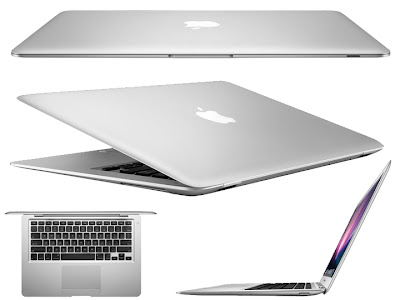
Although Apple's paper thin laptop has quite a bit in common with Intel Ultrabooks, in a few ways we describe below they are significantly different.


Source: PC Magazine


DESIGN


You can't ignore the Apple aesthetic the company's computers always look terrific, and the chic shape and sly silver coloring of the MacBook Air make it among the sharpest of all. Outward attractiveness is not an official part of Intel's ultrabook plan, so you may find something sparkling or something ordinary; it all depends on what choices the manufacturer makes.


COMPONENTS


Everything that goes into a MacBook Air or pretty much any other Apple computer, for that matter must meet Apple's strict requirements and interface properly with the OS X operating system, so every time you pick up an Apple computer you know what you're going to get. Many ultrabook manufacturers, on the other hand, want to keep costs down, and therefore exert less control over the hardware they include. This doesn't mean it will be inferior to what Apple uses, but it does mean that with ultrabooks, as with most other PCs, performance and compatibility characteristics are not as easy to predict. If you can, try before you buy to make sure the touchpad, keyboard, and general responsiveness are what you're looking for.


DISPLAY


The screen on the 11 inch MacBook Air maxes out at a resolution of 1,366 by 768, and the 13.3 inches display at 1,440 by 900. Those are decent specs, and the displays look good, but forget about watching full 1080p video on them, 720p is all they can handle. Most ultrabooks have screen resolutions similar to Apple's, but some out there are capable of displaying full 1080p (1,920 by 1,080) video.


Storage


All of Apple's MacBook Airs are loaded with from 64GB to 512GB of flash storage, making for incredible data access speeds; traditional spinning hard drives are not even an option on the Apple machines. Ultrabooks, however, can come with either, thus requiring the user to choose between storage that's plentiful, inexpensive, and slow, or limited, pricey, and very fast.


CONNECTORS


Any seriously diminutive system is going to have an extremely restricted port selection. What has really defined the MacBook Air to this point has been its Thunderbolt port, which combines PCI Express and Displayport protocols for high speed connections to devices as diverse as hard drives and external monitors, and is about as small as ports get. Thunderbolt ports haven't appeared on PC based ultrabooks yet, but it's only a matter of time until this changes.


HOW THIN AND LIGHT IS THE FUTURE?


As ultrabooks are scarcely more than a year old, it's tough at this point to see how they'll shake out long term. But despite some early stumbles and iffy sales numbers, the form is likely to hang on for a while maybe a long while. As computing devices grow smaller but users want larger amounts of power, they'll have to evolve to stay relevant. But because they're full, feature rich systems, they have more room to grow than is probably the case with even the best tablets and smartphones. Intel will undoubtedly face competition from other imitators, HP came out with an AMD based Sleekbook, for example but it will continue to dominate on the PC side for the time being.


Not that this means there's any chance the MacBook Air will go anywhere. One of Apple's defining (and most striking) products, it's still the first thing people think of when they think of ultrathin laptops and so far no Intel ultrabook has come close to changing that. The biggest threat to the MacBook Air is Apple itself; Can company devise something better to replace it? If not, expect it to continue receiving yearly updates that make it thinner, more powerful, and more exciting.


In any event, super thin laptops are here to stay, all that remains to be seen is where they go next. How much smaller and skinnier can they get? Time will tell, but with Intel and Apple leading the charge and squaring off against each other every step of the way consumers will only benefit by seeing computers that get ever more portable even as they get ever more powerful.


Friday, 10 August 2012

The LaptopLock - Free Tracking and Data Protection Solutions


The LaptopLock is a tracking software,  A free package offering a solid basis for your own security solution.


LaptopLock is a free offering that eschews a fancy interface for a simple, no-frills look. Signing up for the service is quick, you simply need to enter your email address and a password, and you're taken straight to the online control panel. From here you can add a computer, giving it a name for easy reference. From this page you can download software. 


During installation you can choose whether or not show a splash screen when the laptop starts up - it's nice that you're given the choice.


There are no tracking features with this program, so ideally it should be installed alongside a free service that does, such as Prey. What LaptopLock concentrates on is protecting your data if your laptop is lost or stolen; and is broken into three parts. The first security - here you can select the data you want LaptopLock to delete if you flag up your laptop as stolen via the web interface.


Choosing the files and folders is very easy, and you can select to securely delete the data, so that data recovery tools can't access it. If you're not too keen on the scorched earth policy, you can choose to encrypt the files instead.


The second part is notifications. You can select to show a message or play a sound when the missing laptop is in use. The final part is that you can select a program to launch when the laptop is reported stolen - a good chance to run a tracking program, or activate your webcam and upload the photos it takes. The laptop can also be marked as stolen, notifying a recovery team that will begin collecting evidence to hand over to the police. LaptopLock might appear simple, but with it you can make your own laptop security solution.


PC Format Magazine UK

Wednesday, 7 March 2012

Why to Choose Ultrabook | Guide for New Comers


They are the lightest and thinnest laptops yet and the biggest & very popular computing category of the years. Here is what you need to know when joining the Ultrabook generation. [By Eric Grevstad]


ultrabook-2012 Tablets and Netbooks are Toys? Nope. The Holy Grail of Portable productivity is a no compromise laptop with a full-sized, comfortable keyboard; easy on the eyes display; all the performance and ports of a desktop replacement; the convenience of near instant on startup; and all day battery life all in a package so think and light you will forget it�s in your briefcase.


It�s not a new vision, but it has a big new backer or cheerleader in Intel, which at the Computex trade show in May 2011 sketched the outline of what it calls Ultrabooks. In August, the chip giant announced a $300 million marketing and R&D campaign for the new category. And by January 2012�s CES, Intel was boasting of 15-odd Ultrabooks on the market with another 60 designs in the pipeline.


If you would like to board this bandwagon, the first thing to know is that while Intel as a trademark on the capitalized word Ultrabook, it doesn�t have a monopoly on the idea. The 2.9-pound Apple MacBook Air 13-inch dates back to 2008, and its magazine-like-profile, tapering from 0.7 inches thick in back to just 0.1 inch in front, has inspired numerous Ultrabook designers (some Apple fans would say copycats). There�s also a MacBook Air 11 inches.


Samsung-Ultrabooks On the Windows side, Samsung Series 9 also predates Intel�s Ultrabook push, and Samsung doesn�t use the term in describing it; the company�s super thin flagship is available in 13 and 15 inches size. The Series 9 is also, like the MacBook Air, a premium or status symbol machine that lands north of Intel�s pricing guidelines for Ultrabooks theoretically, under $1,000 for 13 inch models, a goal not all manufacturers have met (prices at this writing range from around $800 to more than $1,400 for fully loaded systems).


[PC Magazine March 2012]


Tuesday, 7 February 2012

10 �WOW� Gadgets of the Year


This year�s CES had some �WOW� gadgets inside, & top ten of which are reviewed below for your info. But Ultrabooks and clever cameras were will represented. Complete guide about these gadgets described here.


Nikon D4 | Digital SLR Camera


Nikon-D4-back Photo Nikon has announced the D4 (Digital SLR Camera), a full frame 16 Mega Pixel camera with a �4,799 only camera price tagged. This pro-camera improves on the speed and accuracy of its predecessors, with better image quality and low-light capability. Full HD recording and a multitude of new features have been added to the gadget. Accordingly, it�s clad in magnesium alloy to keep the gadget at bay. The camera has slots for both CompactFlash and the ultra-fast XQD memory format, and can back up between the two. Wireless modules, and extended ISO range, plus a 51-point autofocus all features.


�4,799 inc VAT (body only) | www.nikon.co.uk


Canon PowerShot G1 X | Digital Camera


Canon G1 X Camera Model Canon introduced G1 X, a 14.3 Mega Pixel Digital Compact Camera with a 288mm wide-angle lens. The aperture ranges from f2.8 to f16, while a huge 18.8x14mm CMOS sensor dwarfs that of APS-C and Micro Four Third models. It also allows for faster continuous shooting and full HD video capture. The ability to continuously autofocus while shooting video, plus 14bit RAW image support, distinguish the PowerShot from its rivals.


�699 inc VAT | www.canon.co.uk


Kodak EasyShare M215 | Digital Camera


Kodak-M215 EasyShare-wireless-capability Kodak launched a 14 Mega Pixel (as small as a Credit Size) camera weighs just 105g, but it packs in a lot of technology inside. It sports 26mm wide angle lens with a 5x optical zoom, and comes with Kodak EasyShare software onboard. A self portrait mode is included, and there�s a tiny mirror on the camera�s front so you can fix your hair. Smart capture and face-recognition technology are included. The Kodak M215 supports 720p full HD video recording, and can convert into still images. A 2.5in LCD aids composition and playback.


Toshiba Camileo Z100 | Digital camcorders


Toshiba-Camileo-Z100-Full-HD-3D-Camcorder The latest Digital camcorder introduced in this year CES, Toshiba�s latest Camileo video camera offers full HD video capture at 30fps. A pair of 5Mp CMOS sensors enable it to shoot 3D footage, where an 8x zoom is available. the 2.8in touchscreen offers glasses free previews. The Z100 has a 120x digital zoom in 2d mode, with which it can capture 16 Mega pixel still images. Electronic image stabilization is built in. The user interface has been rethought for this latest model, and a Pause button added for use during recording. Toshiba Camileo Upload software is onboard.


Price to be come| www.toshiba.co.uk


Canon Legria HF-R series | Digital camcorders


canon-legria-hf-r36 Canon blasts with this cool Photography gadget during the CES event, as their Digital camcorder Canon Legria HF-R series having a wireless connectivity to send and share photos to a storage drive or iOS device over Wi-Fi. They extend the Wi-Fi connectivity to the HF-R series only. Key features of the camcorder Legria HF-R36 include Mpeg4 support, optical image stabilization, a 51x digital zoom, cinematic filters and face detection. the camcorder offers 38 scene modes and comes with Story Creator software for easy storyboarding of your resulting footage.


Price to be come| www.canon.co.uk


HP Spectre | Ultrabook


hp-envy-14-spectre-ces-0 Ultrabooks were popular at CES, but HP was the only manufacturer to launch a see-through model. This glass-clad ultraportable has a 14in display, besting the 13in screens of most other Ultrabooks we�ve seen. It also sports near-filed communications. HP has managed to squeeze this screen into a chassis that would normally accommodate only a 13.3in display. There�s also a multitouch trackpad, a choice of 4GB or 8GB of RAM, a 128GB or 256GB SSD and Intel Core i5 or i7 ultra-low-voltage processors. A mini DisplayPort and a USB 3.0 port feature, as do 802.11n Wi-Fi and Bluetooth 2.1. HP says users can expect a battery life of nine hours between charges.


$1,399 | www.hp.com/uk


 DELL XPS 13 | Ultrabook


Ultrabook DELL XPS 13 Dell has introduced their first Ultrabook with 13.3in screen XPS 13, that pays more than a passing resemblance to Apple�s MacBook Air. Aimed at business users, the laptop is 6mm thick, offers an eight hour battery life and weighs 1.35kg. Dell says the 13in laptop is effectively the same overall size as a 11in laptop, and offers as much processing power as a standard laptop, despite its slim dimensions. Smart Connect technology built into the motherboard allows software updates to proceed in standby mode. Intel Core i3, i5 and i7 CPUs, 4GB of DDR3 RAM and SSD configurations of up to 256GB are cited by Dell.


Quaduro QuadPad 3G Plus | Tablet


Quaduro QuadPad 3G Plus For business persons, Quaduro�s 12in screen Quadro should provide the convenience of a familiar Windows interface and the ability to access all their Windows programs and documents on a highly portable device. Specifications include a 1280x800 pixel capacitive touchscreen, a 1.6GHz Inter Mobile D510 CPU, 250GB of storage, two USB 2.0 ports and 802.11b/g/n Wi-Fi. Bluetooth is an option extra, but Quaduro provides for 3G and WLAN Networks.


From �500 inc VAT | www.quaduro.com/en


Orange Tahiti | Tablet


Orange Tahiti Tablet Mobile operator Orange is introducing a 3G Android tablet. Its 7in screen Tahiti will cost you �25 a month for two years, following an initial payment of �69. The contract includes 1GB of peak and 1GB of off-peak 3G web access per month. a �41 a month contract that bundles an Orange San Francisco Android smartphone is also posited. The Tahiti tablet runs Android Honeycomb from a 1.2GHz dual core Qualcomm 8260 processor and 512MB of RAM. It has 8GB of onboard storage, a 5 Mega pixel camera, a capacitive touchscreen and a GPS compass.


From �69 on a �25/month contract | www.orange.co.uk


Sony Xperia Ion | Smartphone


Sony Xperia Ion Sony used CES to unveil the first smarpthone to escape its Sony Ericsson branding. The Xperia Ion is a 12 Mega pixel smart cameraphone that can shoot 1080i full HD video. the Android 2.3 phone has a 4.6in touchscreen and sports a 720p secondary camera. Designed as an entertainment gadget, the phone has a 1.5GHz dual-core processor, and HDMI port, and offers Bluetooth, Wi-Fi and 3G connectivity.


Price to be come | www.sony.co.uk

Tuesday, 24 January 2012

Toshiba Portege Z835-P330 | Lightest Ultrabook


Toshiba_Portege_Z835-P330


A lightest ultrabook yet, having full feature set, with extras like USB 3.0, WiDi 2.0 and full sized HDMI. Longest battery life in the Ultrabooks� category.


The Toshiba Portege Z835-P330 is the newest member of the Portege line, and it�s Toshiba�s first ultrabook. Available exclusively through Best Buy, the Portege Z835-P330 is currently the cheapest of the news slim laptop category of ultrabooks, selling for just under $800. It also has a featherweight chassis, an unusually full feature set, and a long-lasting battery that will take you through an entire workday. Whether or not those highlights are enough to make you overlook its middling performance and mediocre graphics capability is up to you.


The Z835-P330�s solid feel is especially surprising given its size (0.6 by 14.4 by 8.9 inches, HWD) and weight just 2.4 pounds.


The Z835-P330 sports a 13.3 inch wide screen display, with 1,336 by 768 resolution. The screen is backlit (400 nits) for visibility in environments with lots of ambient light. It also offers fairly wide viewing angles, providing clear visibility for yourself and anyone else you want to share the screen with.


There�s very little room for air flow i this slim chassis, and during testing, the Toshiba got very hot up to 102-degree Fahrenheit on the keyboard and 110-degrees on the underside. Granted, our testing process may push the components a bit harder than the average user would, but you still might want to watch out for a possible case of toasted leg syndrome.


The Z835-P330 has a 128GB solid state drive (SSD), which is large enough to accommodate the operating system, a healthy number of programs, and a modest selection of media.


The Z835-P330 is equipped with a low voltage dual-core Intel Core i3-2367M processor paired with 4GB of RAM. It�s a significant step up from the AMD and Intel Atom CPUs found in traditional netbooks, but it�s not as powerful as the Core i5s that have appeared in the MacBook Air 13-inch, the Asus UX31, or the Acer S3.


The battery lasted 7 hours 35 minutes in testing period (PC MAG testing), a full hour longer than the 6:32 offered by the Asus UX31 (with a 50Wh battery), and an additional 2 hours longer than either the MacBook Air or Acer S3.


The Toshiba Portege Z835-P330 may not be the best ultrabook on the market, but it does stand out due to its light weight, exceptional feature set, and category leading battery life.


At last if you favor portability over performance, the Z835-P330 is a solid choice. [Brian Westover]


Social Links