PC Supporter: We are writing reviews & overviews about latest Technology, Gadgets, Social-networks, HP Printers, Operating Sys, PC Games & Wallpapers

Showing posts with label Top Gadgets. Show all posts

Sunday, 2 April 2023

Fujifilm FinePix S3300 | Review


Fujifilm FinePix S3300 - Pictures & Reviews - Shots


Fujifilm FinePix S3300 Is One Of The Finest Cameras Here


Here comes the highly awaited digital camera from Fujifilm that is best known for the super zoom power and outstanding quality of pictures, we are talking about the Fujifilm FinePix S3300 that has been finally made accessible in the market.we will talk about the loveliest characteristics of the camera and we are sure that would be enough to pursue you to buy the camera without any huge problem occurring across our way.this is a highly regarded camera which is used by professionals world-wide.


Fujifilm FinePix S3300 - Pictures & Reviews


We will not just keep bragging about the device but will actually tell you how good it is by discussing all the features of the camera that brings along with it and we are sure you will adore this camera as much as you have been adoring all the other Fujifilm digital cameras.And if in any case, you have not been a Fujifilm customer, you should make your attention even more attentive as this camera is going to change a lot of things in your life, if not your life. the first thing to be noticed by anyone with even the poorest vision is the SLR alike body of this Fujifilm camera.this likeness with the in terms of the appearance Fujifilm FinePix S3300 is something enough for you to flaunt.


then comes the super amazing resolution of the device which is 14 megapixels and which is majorly responsible for clicking some amazing pictures for you.after that we have a surprise for you and that surprise is the optical zoom limit of this camera which is several times more than the usual digital cameras of the other brands available in the market and whose price is similar to the Fujifilm FinePix S3300 price.the power is 26x which can be found only in this camera.the focal length moves form 24mm to 624mm and the aperture varies from F3.1 to F20. the shutter speed of this Fujifilm camera starts from 1/8 sec and goes up to 1/2000 sec.You will also find a viewfinder in the camera which again is not present in other cameras of the same range.


Fujifilm FinePix S3300 - Pictures & Reviews - Specs


the ISO ratings of the camera are 64, 100, 200, 400, 800, 1600, (3200, 6400 @ 3MP or lower).the camera also has self timer option plus the sensor shift image stabilization, face detection, histogram display and PictBridge features in it which no doubt beautify the Fujifilm FinePix S3300 reviews.


[source]


Saturday, 1 February 2014

You Love Music - You would Like BedPhones


Before you settle in for your winter hibernation, slip on a pair of Bedphones. These foam covered headphones are less than a quarter inch thick and are designed to be worn cofortably for extended periods of time a full night's slumber, for example. The cable runs down your back, not front, and the memory wire earhooks mold to ears of all sizes.


With the free Bedphones app for Android and iOS you can set a timer to fade out your music as you drift off to dreamland. But if you love to listen your favorite track tens of time repeatedly, who wants to turn it off and go to dreamland?

Find details here: http://www.bedphones.com 

Wednesday, 17 April 2013

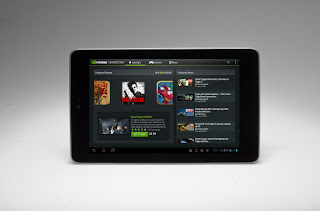
Tablet PC Guide - PC Supporter


2013 is the age of Modern technology - Touch Screen computing & Smart gadgets - The Tablet PC Guide 2013.


It's clear now that tablet PCs are no fad. Beginning with the launch of the high-price, low-powered iPad 1 in April 2010 and culminating with the release of the low-price, high-powered Nexus 7 in July 2012, tablets have gone from being a niche, luxury-only computing peripheral to the latest must-have accessory.


To keep up with technology in 2013, you either have a tablet or you're buying one soon.


However, the fast pace of the tablet world means you can be forgiven for struggling to keep up with the changes to software, hardware, pricing and manufacturing. Sometimes it seems like there's a new tablet every other week, each better and more desirable than the last. Rather than leave you to fend for yourself, we've put together this six-page guide to tablets in 2013 - those that are on Shelves now, those that are being released soon, what you might want to look for if you're buying a tablet and what, if anything, you should avoid.


Here we are describing some features you must know if you are going to purchase a Tablet device.


What Screen Do I Want?


Tablet screens range in size from tech near pocket-sized 5" versions to a comparatively colossal 12 inches on the largest devices, but it is much more typical for screens to be between seven and 10.1 inches in size. Note that this is a diagonal measurement, so a 7" screen is actually has almost half of the visual real estate of a 10" screen (hence the moniker 'mini-tablet' to refer to devices in the 7" to 8" device class.)


While it's tempting to assume that 10" screens automatically better for being larger, there are benefits to 7" devices. Not only are they more portable (it's possible to comfortably hold them in one hand - something that may appeal to those planning to use a tablet as an e-reader), but they're often able to make better use of their technical capabilities, because they're managing fewer graphical resources.


Rather than the screen size, though, pay attention to the resolution. At a minimum, any device you consider buying in 2013 should have a resolution of at least 1024x768 (or similar), but the higher the resolution, the sharper text and images will be - especially when zoomed in. Apple�s Retina display remains the gold standard for tablets, offering a resolution of 2048x1536 on the iPad third- and fourth-generation�s 9.7� screen. The likes of the Nexus 7 and Kindle Fire HD are better-performing in the 7� device class, however, with their 1280x800 resolution easily trumping the iPad Mini�s 1024x768.


How Much Storage Is Appropriate?

Storage is one of the most widely varying factors in the tablet market. Tablets use solid-state drives, which are compact, quiet, shock-resistant and less power-hungry than hard drives. That said, the expense of SSD memory means that tablets therefore have much less space than modern laptops and desktops - typically between 4GB and 64GB.

The amount of built-in storage cannot be changed or upgraded, although many tablets do have slots for memory cards (usually micro-SD), which can be used to add removable storage. Some notable exceptions to this rule are Apple�s iPad range, no model of which has any provision for removable storage, the Kindle Fire, Kindle Fire HD and the Nexus 7, which will only support SD cards and USB flash drives after a combination of software modifications and additional hardware purchases.

The lack of expandable space on such popular devices is something of a contrivance designed to push consumers towards the more expensive, higher-capacity devices. However, the relatively small amounts of storage on modern tablets, combined with their ubiquitous internet connections, has led to an increase in the popularity of cloud storage systems. Apps such as DropBox and SkyDrive allow tablet users to utilise the internet for storage of data, minimizing the trouble associated with a lack of space.

Nonetheless, cloud storage is far from a perfect replacement, and even SD cards can prove fiddly. We�d suggest buying a device with at least 16GB if a model is available. That should be enough to last you the two to three years of the tablet�s life without becoming inadequate.


Does The Processor Matter?


When looking for a tablet, you can expect a number of other components as standard, but some vary from model to model or between manufacturers. The amount of memory and storage space often differs wildly, as does support for external devices and flash memory. Portability factors such as battery life, weight and screen size should also be considered. However, as with desktops and notebooks, the processor is perhaps the chief indicator of how a tablet PC will perform. The most popular tablets run on ARM-based Cortex chips, but a minority run on Intel chips, and there�s even variation within both brands.

Unlike Intel, which develops and manufactures its own processors, ARM Holdings only designs the chips, then licenses the designs for other companies to produce, meaning that there are often multiple variations of single architectures. The most popular chip at the moment is the Cortex-A9, which is the basis for the Apple A5 & A5X chips (used in the iPad 2 and iPad 3), the Nvidia Tegra 2 and 3 (used in the Google Nexus 7 and Microsoft Surface), and the TI OMAP 4 (used in the Kindle Fire and Kindle Fire HD).

While it�s fair to say that devices based on the same chipset have comparable performance to one another, the actual speeds experienced by the user will of course depend on the hardware and software resources available - in particular, the amount of RAM or model of GPU. It is, however, fair to say that the A9 devices are better than the A8 devices, and that the next ARM model (the Cortex-A15) will similarly outclass them both when manufacturers are ready to introduce it later this year.


Although ARM processors undoubtedly have the edge, there are a number of tablets running on Intel hardware, and it�s usually Intel, since unlike the desktop market, AMD does not have a major foothold producing Intel-compatible chips for tablets. Intel�s low-power and portable chips allow tablet PCs to run Windows 7 and 8, although at speeds closer to netbooks than laptops. More powerful tablets may contain full-size Core i5 processors, of the kind found in desktops and powerful notebooks. The increased performance capacity makes for a better Windows experience, but they are less compact and consume more power than mobile chips, meaning a worse battery life and a larger, less portable form factor.

For Windows users here are 6 features your Windows Tablet PC must have, before you go and select one to purchase.


Wednesday, 14 November 2012

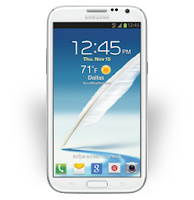
Samsung Galaxy Note-II - Smartphone or Tablet


Comparing to a Tablet Device, Samsung Galaxy Note - II have everything identical, specially a 5.5 inches of large display screen. 


Samsung Galaxy Note-II

A smartphone this broad and tall falls more naturally into two-handed operation actually. There is no denying this is a large device, even by modern mobile standards. It's around 151mm high and 81m wide, and 9.9mm thick. Weighted including a cover flap that wraps around the front, it was 214g, which is not insubstantial.


According to physical functionality, it seems very comfortable to operate with two hands, one to hold and one to tap. Samsung offers an option within Android's Settings titled 'One handed operation', which places the onscreen keyboard, Dial-pad and Calculator to one side. But as still its Dial-up icons are unreachable to single hand thumb, you should dial it with two hands.


Structure and Key Feature


The build is plastic, but good, feeling weighty and all of a piece in the hand. The screen quality is excellent, and it doesn't reveal the same over ripe coloring of other Samsung Super AMOLED displays.


Camera


Picture quality from the rear 8Mp camera is not bad, high contrast areas show purple fringing, although the camera is fast in operation. Recorded HD video is usable, but its suffers from focus hunting issues even in good light. Shot footage looked smeary on even slow pans.


 Interior Specifications


by PC Advisor Magazine


The Note II's innards are very similar to those of the Galaxy S III. Inside is a Samsung Exynos 4412 SoC based on a quad-core ARM, but clocked at 1.6- rather than 1.4GHz. This is the fastest clocked ARM smartphone we've seen and, combined with Android's latest 4.1 Jelly Bean OS, it bodes well for performance.


Jelly Bean promises smoother graphics, here powered by an ARM Mali-400 MP GPU. It's relatively speedy, and faster than the nVidia Tegra 3, if wel short of the fastest available mobile graphics solutions.


In our performance tests, the Note II approached the capability of the iPhone 4S. It managed 17fps in the Egypt HD test, against 19fps for the previous generation Apple phone. The iPhone 5 played the same benchmark at 38fps. Other test results like Gauge Processor speed test and SunSpider JavaScript test also was better then iPhone 5, which is remarkable.


Battery Life is also not bad, as PC Advisor Magazine says "We found battery life good enough to last two days of sporadic use, in park thanks to a large 11.78Wh removable battery packed inside".


Tuesday, 30 October 2012

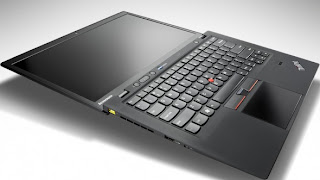
5 Top Features Your Ultrabook Must Have


5 Top Features Your Ultrabook Must Have if you prefer to buy one rather than MacBook Air.


According to your use and profession If you consider that Ultrabook suits you more than MacBook Air or you are interested to buy an Ultrabook rather than MacBook Air, so there are some actual features your Ultrabook must have.


According to style, features and something that called Trend, Apple's MacBook Air is a top Notebook but on other side Intel's super fast chipped Ultrabooks is more liked because of its compatibility and user friendly environment operating system (Windows).


So you have decided you want to buy an Ultrabook rather than a MacBook Air? Here are 5 top features to consider before making your purchase.


Quality Construction


Quality Construction - Ultrabook


Many of the unique or unusual characteristics about Ultrabooks come about because they're so thin, a height of three quarters of an inch, and even less in some cases. One of the most important of these is the systems' tendency to feel flimsy. Because most laptops don't sit at home on your desk all the time, you want the sturdiest on you can find, whether it's open or closed.


Keyboard


Keyboard - Ultrabook


Key travel on Ultrabooks is frequently shallow, after all, there's not a lot of room to house big, strong keys! This won't be a problem for everyone, but if you're a hard core typist or if you are going to need your laptop for work, you'll want to pay special attention to the keyboard. If you can, try typing on an Ultrabook you're interested in before you take it home to get an idea of how it feels beneath your fingers. You don't want to buy a notebook you won't enjoy typing on.


Port Selection


Port Selection - Ultrabook


The reduced height of ultrabooks causes problems with ports as well. Many systems simply don't have room for Ethernet ports, some have far fewer USB ports than you may be used to (may be only one or two), and still others may come with dongles that give you the ports but add inconvenience to the package. Knowing what you need, so you know what you'll need to put up with, is an especially good way to go here.


Touch Screen


Touch-Screen - Ultrabook


Although not a part of the standard ultrabook specs, and previously impossible to find on many systems, touch screens should now be considered a necessity. The new tile based Windows 8 interface was designed for touch, and the operating system just doesn't deliver the same experience without it. A laptop with a traditional touchpad will work, but it won't be anywhere near as intuitive. To get the most out of your Windows 8 Ultrabook, make sure it comes with a touch screen.


Wireless Display


Intel's Wireless Display technology (usually shortened to WiDi) lets you stream HD content over the air to your HDTV, rather than forcing you to connect your set to your laptop with an HDMI cable. You'll need a separate adapter, like Netgear's $100 Push2TV (pictured here), to make it work, but if you're really into entertainment you'll easily find WiDi capability worth the extra investment.


Social Links