PC Supporter: We are writing reviews & overviews about latest Technology, Gadgets, Social-networks, HP Printers, Operating Sys, PC Games & Wallpapers

Showing posts with label windows 8. Show all posts

Sunday, 11 May 2014

How to Choose the Right Tablet? | PC Supporter


How to Choose the Right Tablet? Windows: Android, Apple, or

By Wendy Sheehan Donnell

It's difficult to remember a time before tablets, but it's been four short years since the original Apple iPad hit the scene, and the current tablet market was born. Since then, we've seen scores of manufacturers trying to snag a slice of the tablet pie. And the game is finally getting interesting: For the first time in 2013, Android tablet sales overtook the iPad. Growth is so rapid in the segment that some analysts claim tablets will make up half the PC market in 2014. There's no denying the tablet is here to stay.
But which tablet is right for you? Whether you're eyeing an iPad, one of the many Android tablets available, or a Windows model, here are the key factors you need to consider when shopping for a tablet:

Thursday, 8 May 2014

How to Install HP LaserJet 1320 Printer in Windows 7?


How to Install Hp LaserJet 1320 Printer in Windows 7?

Today Windows 7 is the most popular Operating System using in Homes & Offices all over. In early days due to non-compatibility and support to many Devices (like Printers, Scanners etc.), Windows 7 was not a Primary Operating System according to Professional’s remarks.
Many companies made their devices compatible to this New Operating System with updating their Software and Drivers for Devices like Printer, Scanners etc., some of other companies made brand new Devices for new operating system. But some devices were far behind due to non-compatibility with Windows 7, and users were waiting for new release of drivers.

Monday, 19 November 2012

6 Features - Your Windows 8 Tablet Must Have


Windows 8 Build for Touchscreen Devices? Yes, but do your new Windows 8 Tablet have these 7 features?


Before going to overview these features, first we talk a little about New Windows 8 Operating System. There are two main version of Windows 8 are available for touchscreen gadgets, "Windows RT and Windows 8". 


Basically Microsoft prepare and organize this new operating system for touchscreen devices, no doubt, and doesn't matter if its RT or 8 version, but Windows RT is slightly different than 8, as it designed to be more friendly with Touchscreen devices, Internet connectivity and as well for a device with longer battery life. Although some tablets makers ( I would say) don't like it, but if we go deep inside, Windows RT is viewed as more of a tablet operating system in the mold of Apple's iOS, while Windows 8 tablets may appeal to PC users looking for backward application compatibility. 


According to PC Advisor (a technology magazine publishers), "The cheapest RT tablet is Microsoft's Surface, which starts at �399." And "Windows 8 tablets will be competitive on price, however.


Lets talk about 6 features your new Windows 8 tablet must have.


1. Application compatibility


With a few exceptions, existing Windows applications will not work on RT. This is partly because ARM processors haven't previously supported major desktop Windows client OSes. But existing applications will work on Windows 8, as previous Windows OSes over the past few decades were written primarily for Intel or AMD processors. Microsoft has adopted a new application model with Windows RT and 8, and users will be able to download apps through the Windows Store.


2. Peripherals and accessory compatibility with RT


A lack of drivers may prevent some older peripherals, such as printers or cameras, from working with RT, but that doesn't mean your peripherals won't work. It's worth checking with device makers to see whether they have drivers for RT. Dell and HP have published compatibility lists for their printers.


Read here if you searching for your PC hardware drivers, compatible with Windows 8. "Where To Download the Latest Windows 8 Drivers for Popular Hardware"


3. Memory Limit


Windows RT is only 32bit, so tablets running the OS can draw on only up to 4GB RAM. Windows 8 tablets with Intel's Clover Trail Atom chip will also be only 32bit. However, tablets with Intel's PC-like Core processors run a 64bit version of Windows 8, and can handle more RAM and storage.


Tablets are adequately served with 32bit processors today but, with the usage of demanding applications growing, storage and memory needs will increase in mobile devices. ARM has taken a step ahead by announcing its ARMv8 64bit architecture, with chips likely to appear in 2014. Microsoft has not announced its 64bit plans for Windows RT.


4. ARM processors options


Windows RT tablets have already been announced with chips from nVidia and Qualcomm, which are based on ARM processors. Microsoft's Surface, Asus' Vivo Tab RT and Lenovo's IdeaPad Yoga 11 hybrid use nVidia's quad-core Tegra 3 processor, which may appeal to gamers and users looking for fast performance. Samsung's Ativ Tab and Dell's XPS 10 run Qualcomm's dual-core Snapdragon S4, which balances performance, battery life and connectivity.


5. Hardware limits


Windows RT tablets have only USB 2.0 ports. However, backward compatibility allows peripherals such as external storage devices with USB 3.0 ports to connect to RT tablets. The peripherals will work only if compatible with Windows RT, though, USB 3.0 ports are available in Windows 8 tablets running Intel's Core processors.


6. Enterprise Features


Dell and Samsung have highlighted enterprise features in RT tablets. Dell's XPS 10 tablet can be remotely disabled if lost or stolen, and software images and updates can be pushed to tablets. Dell has also included some security features such as TPM, a hardware-based cryptography and authentication technology. Samsung has included Microsoft Exchange and Cisco VPN support in its Ativ Tab.


Tuesday, 30 October 2012

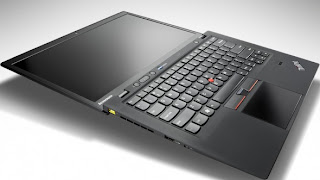
5 Top Features Your Ultrabook Must Have


5 Top Features Your Ultrabook Must Have if you prefer to buy one rather than MacBook Air.


According to your use and profession If you consider that Ultrabook suits you more than MacBook Air or you are interested to buy an Ultrabook rather than MacBook Air, so there are some actual features your Ultrabook must have.


According to style, features and something that called Trend, Apple's MacBook Air is a top Notebook but on other side Intel's super fast chipped Ultrabooks is more liked because of its compatibility and user friendly environment operating system (Windows).


So you have decided you want to buy an Ultrabook rather than a MacBook Air? Here are 5 top features to consider before making your purchase.


Quality Construction


Quality Construction - Ultrabook


Many of the unique or unusual characteristics about Ultrabooks come about because they're so thin, a height of three quarters of an inch, and even less in some cases. One of the most important of these is the systems' tendency to feel flimsy. Because most laptops don't sit at home on your desk all the time, you want the sturdiest on you can find, whether it's open or closed.


Keyboard


Keyboard - Ultrabook


Key travel on Ultrabooks is frequently shallow, after all, there's not a lot of room to house big, strong keys! This won't be a problem for everyone, but if you're a hard core typist or if you are going to need your laptop for work, you'll want to pay special attention to the keyboard. If you can, try typing on an Ultrabook you're interested in before you take it home to get an idea of how it feels beneath your fingers. You don't want to buy a notebook you won't enjoy typing on.


Port Selection


Port Selection - Ultrabook


The reduced height of ultrabooks causes problems with ports as well. Many systems simply don't have room for Ethernet ports, some have far fewer USB ports than you may be used to (may be only one or two), and still others may come with dongles that give you the ports but add inconvenience to the package. Knowing what you need, so you know what you'll need to put up with, is an especially good way to go here.


Touch Screen


Touch-Screen - Ultrabook


Although not a part of the standard ultrabook specs, and previously impossible to find on many systems, touch screens should now be considered a necessity. The new tile based Windows 8 interface was designed for touch, and the operating system just doesn't deliver the same experience without it. A laptop with a traditional touchpad will work, but it won't be anywhere near as intuitive. To get the most out of your Windows 8 Ultrabook, make sure it comes with a touch screen.


Wireless Display


Intel's Wireless Display technology (usually shortened to WiDi) lets you stream HD content over the air to your HDTV, rather than forcing you to connect your set to your laptop with an HDMI cable. You'll need a separate adapter, like Netgear's $100 Push2TV (pictured here), to make it work, but if you're really into entertainment you'll easily find WiDi capability worth the extra investment.


Saturday, 11 August 2012

Will Windows 8 be More Secure?


Martin Cooper takes a step back from all the Windows 8 fanfare and examines whether the cyber criminals will love or loathe Microsoft's new OS.


Window 8, Win8 phone and Surface tablets - it seems it's all happening over at Redmond. As Microsoft's readies its new operating system roll out, we've every right to get excited, but with all eyes distracted by the new system's sheen, it's easy to overlook the mundane but essential business of security.


Over last 12 to 18 months, security - of the lack thereof has cast a growing shadow over Windows and the antivirus firms we trust to keep us safe online. Indeed, some have suggested that the bad guys might be winning in the never-ending game of high stakes chess. So the question is, will Windows 8 let us sleep sounder in our beds?


Security as Standard


To help protect Windows machines Microsoft has for a long time offered its Security Essentials antivirus program as a free download. Despite this, it's reckoned that almost a quarter of all Windows 7 PCs have no anti-malware software installed.


To address this problem, Microsoft has opted to install Windows 8 Defender by default.


 Windows 8 Defender is a combined system. it's comparable with Security Essentials, with basic protective features thrown into combat common threats.


We certainly applaud the move, as it makes the initial hurdle that much tougher for virus writers. However, when PC Format asked Collin Davis, senior director of engineering at Symantec, about Defender, his response was unequivocal. "It's not enough".


Davis says circumventing Defender will become the virus writer's first mission. "It's just not worth their effort releasing malware that can't beat it," he warned. Speaking from California. Davis explained how the bad guys had breached Windows 7's security features and Security Essentials.


As Windows 7 and 8 have so much in common under the hood, Windows 8's default security isn't - in his view - likely to overly challenge malware writers.


Boot Level Protection


Dig a little deep into Windows 8 and the story doesn't seem so bleak. During the PC boot phase, Microsoft has made strides to see off future malware.


Booting through the BIOS has remained largely unchanged for nearly 30 years. At its heart is a chain of module that tare executed in order. The process begins with the BIOS waking up, taking in ROM-based operations and calling on the master boot record.


The chain culminates in the Windows kernal and drivers being loaded and run. If malware can penetrate this initial process, the next program to run can be corrupted. In short, no process after the point of exploitation can be trusted.


 Malware such as Mebroot, TidServ and StuxNet insert themselves into this critical chain of events, compromising Windows at a very low and fundamental level. From such a privileged position it makes itself hard to detect and difficult to remove.


To combat this problem, Windows 8 includes a trio of technologies which are known collectively as Secure Boot Architecture. The first component is the Unified Extensible Firmware Interface, or UEFI. Assuming that your hardware is current and supports it, UEFI should make the lives of the virus writers' considerably harder.


Liek the BIOS, a UEFI system executes a sequence of baton-passing modules that lead to the OS . In a UEFI system, however, modules are security-signed and each module must check the subsequent operation's signature before it allows the next process to execute. The UEFI chain can be updated with a white list of trusted certificates.


Features and Flaws


The UEFI system isn't without a couple of flaws. Though all contemporary Windows systems will come with it as standard, older PCs still use the BIOS loading process and therefore remain vulnerable. The UEFI certification system has also enraged Linux users, as it makes it difficult to install the open source OS.


The next technology of note in Windows 8 is Early Load Anti-Malware. According to Microsoft, "|ELAM| starts before other boot-start drivers, enables the evaluation of those drivers and helps the Windows kernal decide whether they should be initialized." It is, in essence, a way of detecting malware during the boot process and blocking it.


Most Malware that Runs on Windows 7 will work on Windows 8


Windows 8 is designed to boot very quickly through, which places limits on what ELAM can achieve.


The Windows 8 specification also limits the amount of memory it can consume. Because it runs so early in the boot sequence and under such limitations, Symantec has already stated that "ELAM does little to improve security".


Remote Attestation is an optional feature. Implementing it inevitably slows down the boot process, which may not prove very popular with PC builders. If you upgrade or tinker with your PC, the timing check system will also need to be recalibrate. Remote Attestation, therefore, looks like a feature that we think will be best suited to corporate environments where systems remain unchanged by design.


The Metro Question


Windows 8 is all about the Metro interface - a collection of tiles linked to programs. Simply sweep though the wall of information and images, then tap the program you want to run. If you don't have a table or other touch enabled devices, you can use the interface with a mouse and keyboard instead.


There are two versions of Windows 8 - one designed to run on x86 chips and another complied for low-power ARM processors. The PC firms we spoke to had little to say about the latter version, and it's unlikely that malware authors have been able to research it much either. If Windows RT (as the ARM version is called) becomes a success, it will probably become the focus of malware writers, but at the moment it's impossible to say.


Looking at the x86 incarnation, Collin Davis explained that Windows 7 and Windows 8 classic are very close cousins. Therefore, most malware that runs on Windows 7 will work on Windows 8. Metro is however a different beast to a degree.


The Janus OS


From a security perspective it's easy to think of Windows 8 as two operating systems; Metro and Classic. Neither will run programs designed for the other. Metro is the more restrictive of the two, as you'll only be able to get programs from Microsoft's App Store, but the separation between Metro and classic Windows isn't clear cut.


Each Metro app works in a sealed environment or sandbox, which means it can't interact with other programs. In other words, Metro works in much the same way as Apple's sandboxed iOS - an OS that has so far avoided any major security silver bullet though. it is, in the words of Davis, "One of many tools that works well if it's done well."


Asked if Microsoft has implemented its sandboxing well, Davis replied, "It's too soon to tell."


There is one major chink in Metro's sandbox Armour. Metro is much like Windows Media Center-an environment that effectively sits on top of Windows Classic. Davis says this means that "a Metro app can't attack a Classic app, but a Classic app can attach a Metro one."


He adds that developing malware for Metro would be no harder or more expensive for virus writers.


It seems then Windows 8 makes the business of securing your PC subtly different, yet largely the same. The same rules, requirements and risks apply, so users should install a well-rated security suite and keep it updated.


Source: PC Magazine [UK]


Social Links